
Mesh quality assessment in CIVA UT FEM module
Computation time is a critical aspect of simulations based on Finite Element Models, particularly in the “FE Beam Computation” and “FE Inspection Simulation” modules.
In order to avoid any unnecessary loss of computation time, it is important to ensure that the settings are appropriate before running calculations. Mesh verification is part of this verification process.
In this context, CIVA offers two pre-analysis tools for mesh assessment before computation: “Mesh Level 1” and “Mesh Level 2” (found in Simulation settings > Options).
For configurations with mechanical scanning, the mesh assessment can be performed either for the current position or for all positions. In any case, the mesh will be displayed in the current position only.
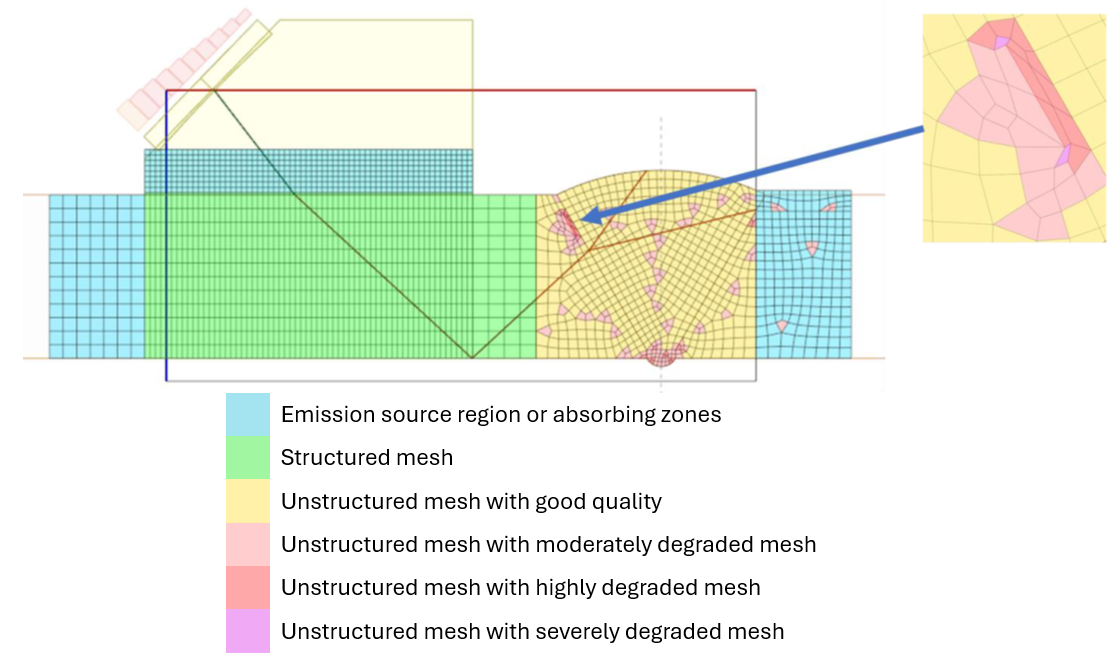
Mesh Level 1: This creates and visually displays the mesh. First-level alerts will also be displayed if the configuration causes problems and the mesh cannot be generated.
Mesh Level 2: Built on the “Mesh Level 1” tool, this procedure adds a more detailed analysis, which includes a color-coded highlighting of the quality level mesh elements that may negatively impact computation time.

If one or more degraded mesh elements are detected, it is recommended to review the settings and to adjust the following options:
- Try a different “Element type”:

- Reduce the “Mesh factor”:

- Simplify the configuration